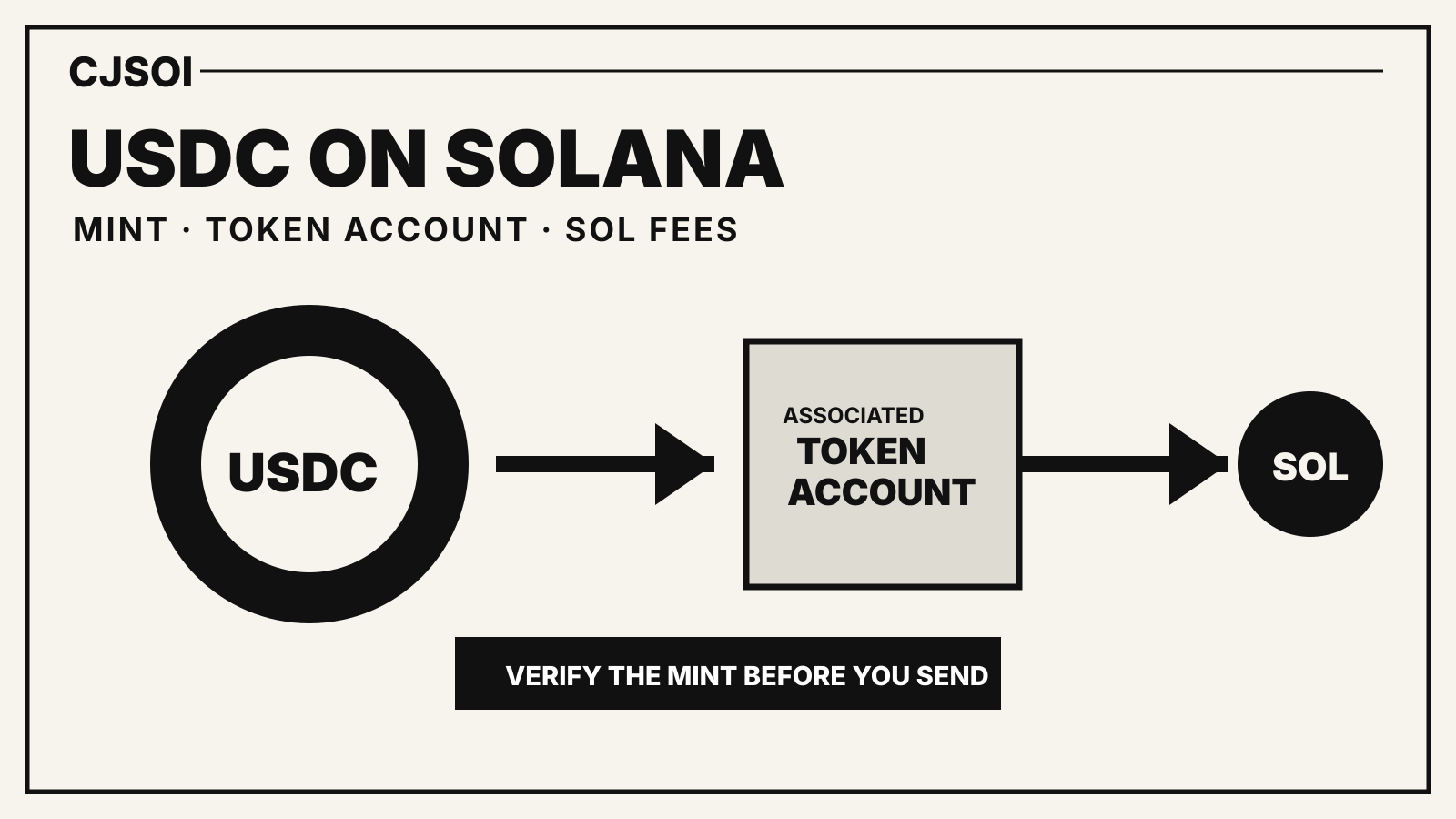
USDC on Solana is not just “USDC with cheaper fees.” A safe transfer requires the Solana network, Circle’s native USDC mint, a compatible token account for the recipient and enough SOL to pay network costs.
Quick answer Select Solana at both the sending and receiving service. Verify Circle’s USDC mint as
EPjFWdd5AufqSSqeM2qN1xzybapC8G4wEGGkZwyTDt1v. Keep SOL available for transaction fees. If the recipient does not yet have a USDC associated token account, the transaction may need to create one and fund its refundable minimum balance.
This guide explains the mechanics. It is not investment advice, and it does not claim that every exchange supports Solana deposits or withdrawals.
The three identities you must match
A USDC transfer on Solana has three distinct identities:
- The network: Solana.
- The token mint: Circle’s native USDC mint on Solana.
- The recipient’s token account: the account that holds that mint for the recipient’s wallet.
A wallet address alone does not prove that an exchange deposit screen expects Solana. A token labelled “USDC” does not prove that it is Circle’s supported native asset. Check both ends before sending.
Circle’s supported-chains reference lists Solana as a supported chain for USDC. It also warns customers not to send unsupported or bridged assets to Circle Mint.
Circle’s native USDC mint on Solana
The mint address shown in Solana’s payments documentation for USDC is:
EPjFWdd5AufqSSqeM2qN1xzybapC8G4wEGGkZwyTDt1v
A mint account defines a token. Token accounts then hold balances of that mint for particular owners.
Compare the mint in your wallet or explorer with the full address. Do not rely on a ticker, logo or a shortened prefix. Anyone can create a token and label it USDC.
Why Solana uses a separate token account
On Solana, the wallet’s main address is not itself the USDC balance. The balance sits in a token account for that owner and mint.
Most wallets use an associated token account. Its address is derived from:
- the wallet owner;
- the token program; and
- the mint.
That deterministic design lets software find the expected USDC account for a wallet. One wallet can have separate token accounts for USDC, other tokens and sometimes additional accounts for the same mint.
The recipient does not need to sign an incoming transfer. The sender or another fee payer can create the recipient’s associated token account when needed.
The first-transfer account cost
Solana accounts need a minimum balance to remain on-chain. The Solana payments guide estimates about 0.0029 SOL to create a token account, while stating that the figure is an estimate and should be checked against current network conditions.
That balance is not the same as a normal transaction fee. It funds the new account and is generally recoverable if the token account is later closed correctly.
If the recipient already has the expected USDC associated token account, the sender does not need to create another one for the ordinary transfer.
Transaction fees are paid in SOL
Solana’s fee documentation splits a transaction fee into:
- a base fee, required for the signatures; and
- an optional priority fee, used to request priority.
The payments guide gives an illustrative base fee of 5,000 lamports per signature for a simple transfer. Fees and priority calculations can change, so wallet and RPC estimates near submission are more reliable than a copied number.
USDC cannot pay the native network fee by itself. The fee payer needs SOL. That fee payer can be the sender or, in a sponsored transaction, another account configured by the application.
A safe exchange-to-wallet transfer
- Open the receiving wallet and confirm it supports Solana.
- Confirm the wallet address from the wallet itself.
- In the exchange withdrawal screen, select USDC and then Solana.
- Verify that the exchange is sending Circle’s native Solana USDC, not a bridged token.
- Check the exchange’s withdrawal minimum and fee on the confirmation screen.
- Send a small test amount when the destination or route is new.
- Wait for confirmation, then compare the transaction’s mint and recipient token account in a Solana explorer.
- Send the remainder only after the test arrives correctly.
If the exchange does not list Solana for that asset, do not substitute another network because the address field accepts the text.
A safe wallet-to-exchange transfer
Deposits require the receiving exchange’s exact instructions.
- Choose USDC in the exchange deposit screen.
- Select Solana.
- Copy the deposit address only after the network is selected.
- Check for a memo, reference or other exchange-specific requirement.
- Verify the wallet is sending the native mint.
- Keep enough SOL for the transaction and any account creation.
- Test first if the exchange allows it.
An exchange may pause deposits, change minimums or stop supporting a network. The public blockchain being live does not prove the exchange’s deposit system is available.
Native USDC versus a bridged token
A bridged asset is issued or represented through a bridge route. It can carry a similar name or value target, but it is not automatically interchangeable with Circle’s native USDC in every wallet, exchange or Circle product.
Circle’s documentation explicitly warns against sending unsupported or bridged USDC assets to Circle Mint. More generally, if a service expects one mint and receives another, it may not credit the deposit automatically.
Check the full mint address and the receiver’s supported-asset documentation. Do not infer compatibility from price or symbol alone.
What can fail
Wrong network
The sender selects another chain while the recipient expects Solana. Recovery depends on the receiving service and may be impossible.
Wrong mint
The transfer reaches a Solana address, but the token is not the supported USDC mint. A wallet may display it; an exchange may not credit it.
Not enough SOL
The fee payer cannot cover the base fee, optional priority fee or a new token account’s minimum balance.
Deposit service paused
The on-chain transfer succeeds while the exchange has paused Solana deposits. Credit can be delayed until the service resumes or support handles it.
Address copied incorrectly
Solana addresses are case-sensitive base58 strings. Use copy-and-paste and compare the beginning and end before confirming.
Read the transaction after sending
A block explorer can show:
- the signature;
- success or failure;
- the fee payer;
- SOL fees;
- the token mint;
- the source and destination token accounts; and
- the token amount.
Do not treat “confirmed” as proof that an exchange credited the right customer. Confirmation proves the transaction reached the chain. The exchange still maps the deposit to its internal account.