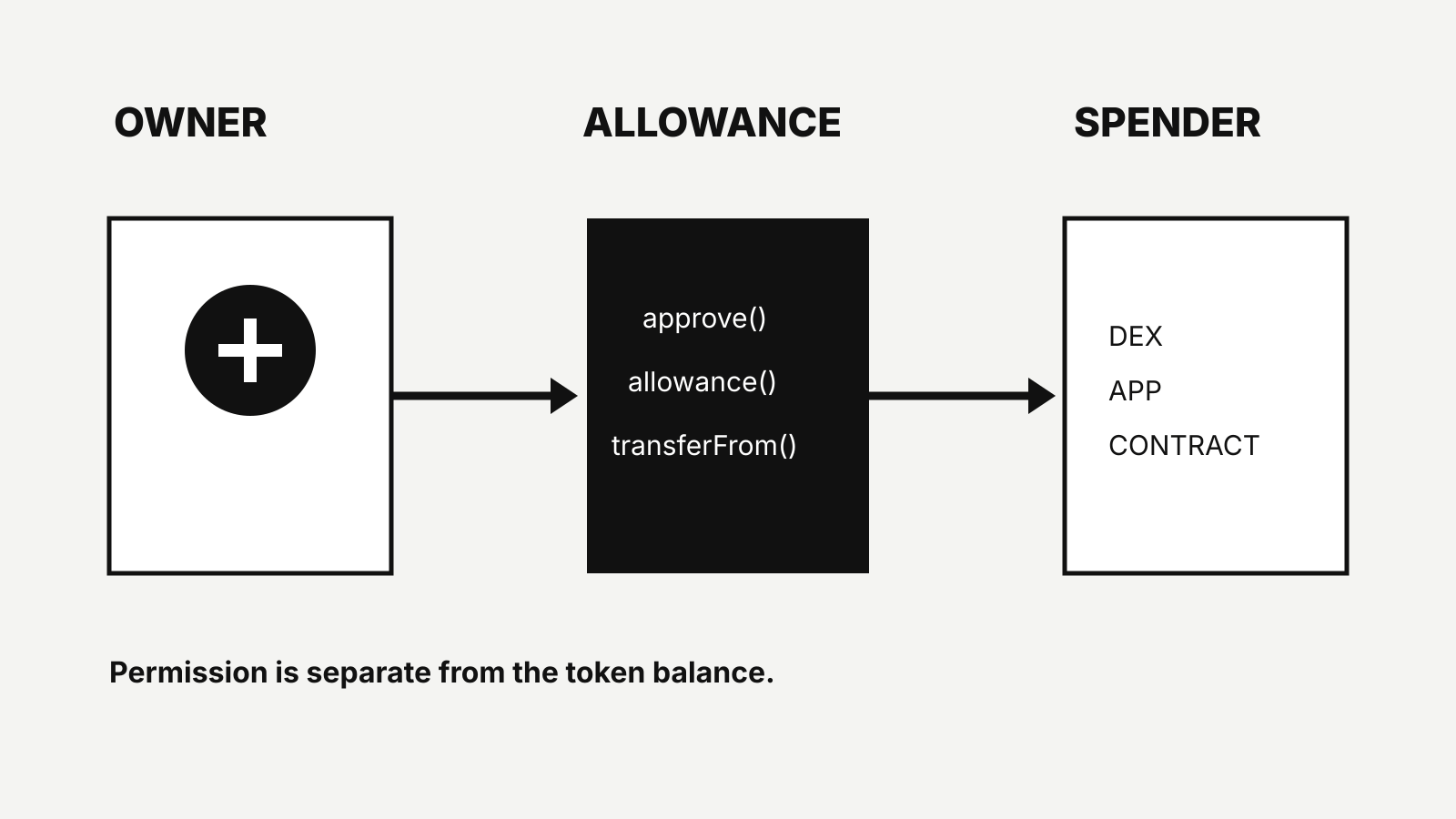
An ERC-20 allowance lets another address spend tokens from your wallet up to a limit. It does not move USDC, USDT or another token by itself. The later transferFrom call is what uses the permission.
This distinction matters when a wallet asks you to “approve” a decentralized exchange, bridge or payment contract. You are authorizing a spender, not merely signing in.
Documentation reviewed: 28 October 2026. Contract behavior can vary. Verify the token contract, spender and transaction data in your wallet.
The three addresses in an allowance
An allowance has three parts:
- owner — the wallet that holds the tokens;
- spender — the contract or address allowed to use them;
- token contract — the ERC-20 contract that stores balances and allowances.
The ERC-20 standard defines approve(spender, value), allowance(owner, spender) and transferFrom(from, to, value). The canonical specification is ERC-20.
The permission exists inside one token contract. Approving a spender for USDC does not approve the same spender for every token in the wallet.
Approval is separate from payment
A common application flow is:
- the user approves a contract for 100 USDC;
- the contract checks the saved allowance;
- the user or application starts the intended action;
- the contract calls
transferFromfor the required amount; - the allowance is reduced if the token follows the standard pattern.
The approval transaction can succeed while the later swap, deposit or payment fails. That leaves the remaining permission in place.
A wallet balance also does not cap the long-term permission. If an allowance is larger than the current balance, a spender may be able to use tokens that arrive later, subject to the token and contract logic.
Exact amount or unlimited allowance?
Applications often offer two choices.
Exact allowance
The approval matches the intended amount. A 75 USDC payment gets a 75 USDC allowance.
This limits what the spender can use, but a later transaction with a changed amount may require another approval.
Unlimited allowance
The approval uses a very large value so the application can perform future actions without another approval transaction.
This reduces repeated approval steps and gas costs. It also leaves a larger permission if the spender contract is compromised, upgraded unexpectedly or used through a malicious interface.
“Unlimited” is a wallet label for a very large number. It does not mean the contract can take native ETH or unrelated tokens.
The allowance-change race in ERC-20
The ERC-20 specification warns that interfaces should set an existing allowance to zero before changing it to another non-zero value because of a known ordering risk. The standard does not enforce this behavior in the contract.
Modern wallets and applications may manage the sequence for users, but the underlying lesson remains: changing an active permission is not the same as editing a local setting. Both transactions can be observed and ordered onchain.
If a wallet asks for two transactions — reset to zero, then approve the new amount — read both before signing.
What permit changes
ERC-2612 adds a permit function that can set an ERC-20 allowance from a signed message. The owner does not have to send the approval transaction directly.
Permit can improve the user flow, but it still creates an allowance. A signed permit is not harmless because no gas is shown in the wallet. It contains:
- the owner;
- the spender;
- the value;
- a nonce;
- a deadline;
- the token contract’s domain information.
Check those fields as carefully as an onchain approval. A malicious site can request a permit for the wrong spender or a much larger value.
Not every stablecoin contract supports the same permit design. Use the contract address on the issuer’s official list. Circle maintains USDC contract addresses by blockchain.
How to review an approval request
Before signing:
- Confirm the network. An Ethereum approval is separate from an approval on another chain.
- Confirm the token contract. Symbols and names can be copied by fraudulent tokens.
- Read the spender address. It should match the application’s official documentation or verified interface.
- Read the amount. Decide whether an unlimited permission is necessary.
- Check the action after approval. The approval may only be step one.
- Keep enough native token for gas. Token approval and the later action can be separate transactions.
Our Ethereum gas fee guide explains why ETH pays for ERC-20 transactions.
Revoking an allowance
A revocation usually sets the allowance to zero in the token contract. It requires a new transaction and network fee.
Revoking blocks future transferFrom calls under that permission. It cannot reverse a transfer that has already executed. It also does not cancel permissions for another token, network or spender.
When reviewing old approvals, prioritize:
- unknown spenders;
- contracts you no longer use;
- unlimited permissions;
- applications that have reported an incident;
- permissions on wallets that now hold more value.
Use a trusted block explorer or wallet feature. Verify that the revocation transaction targets the correct token contract and spender.
Allowance is not custody
An allowance does not transfer ownership of the private key. The tokens remain at the owner address until a transaction moves them.
But the practical risk can resemble delegated access: an authorized spender may move tokens without another signature from the owner, within the saved limit and contract rules.
That is why an approval deserves the same care as a payment instruction.
Questions people ask
Does approving USDC send USDC?
No. Approval records a spending limit. A later transferFrom call moves tokens.
Can a spender take more than the allowance?
A standard-compliant ERC-20 transferFrom must stay within the allowance and balance. Contract bugs, non-standard tokens and compromised interfaces are separate risks.
Does disconnecting a wallet revoke approval?
No. Disconnecting usually removes the website session. The allowance remains in the token contract until changed onchain.
Is a permit safer than an approval?
It changes how the allowance is authorized, not what the allowance permits. Check the spender, value, deadline and domain before signing.
Sources
This article is an operational explainer, not security or investment advice.